

Today I Learned
1. 기본 정보
- Binding Port: Redis 서버는 기본적으로 TCP 6379 포트를 사용
- Redis generally uses RESP as a request-response protocol
- 프로토콜: Redis Protocol (RESP2)
2. RESP (Redis Serialization Protocol)
2.1 RESP 특징
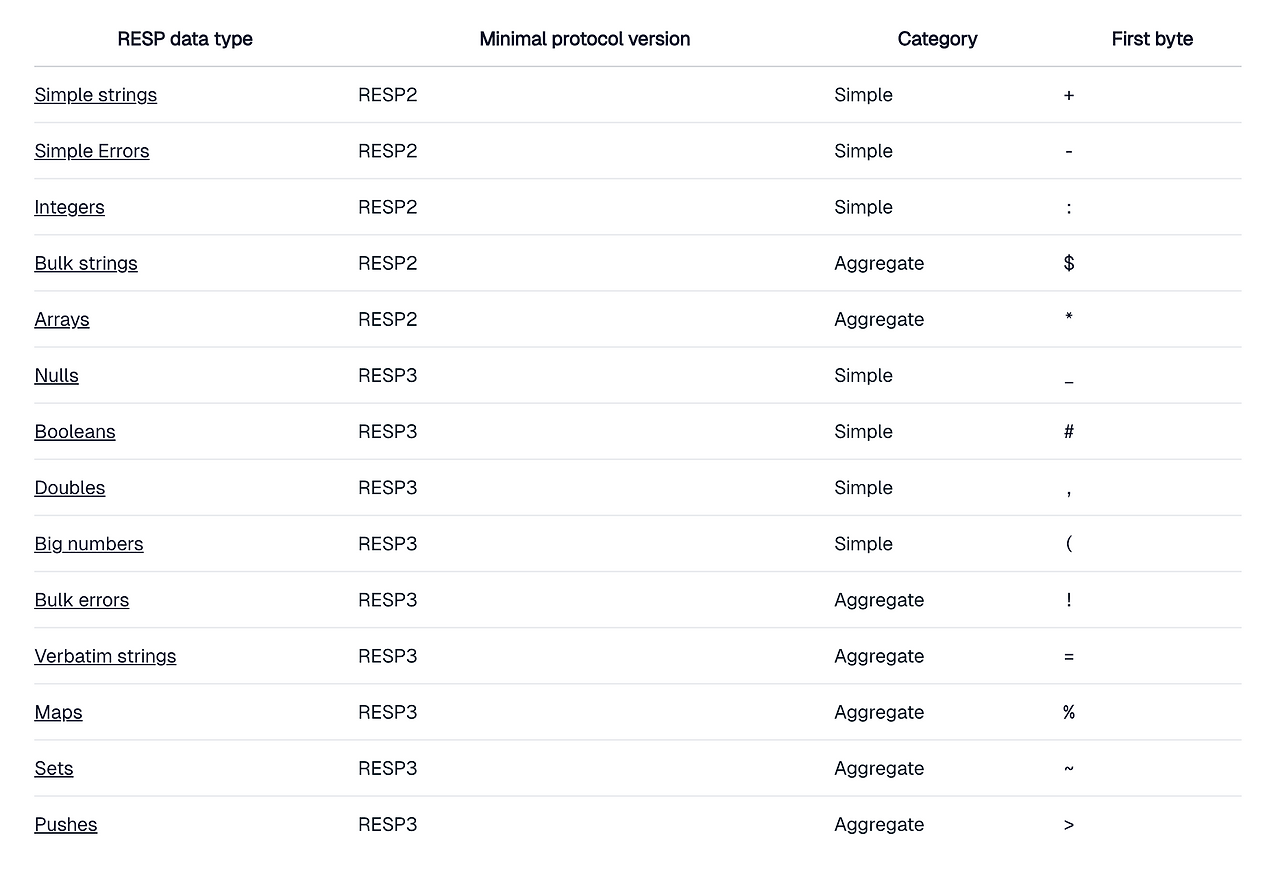
- 다양한 데이터 타입을 지원하는 직렬화 프로토콜
- 표준 ASCII로 인코딩된 제어 시퀀스를 사용하는 이진 프로토콜
- 모든 RESP 데이터는
\r\n(CRLF)로 종료됨
인코딩 예시:
A → 65
문자 CR(\r)  → 13
LF(\n)) → 10
SP( ) → 32
2.2 RESP 데이터 타입 분류
- simple 타입: 단순한 리터럴 값을 나타내는 프로그래밍 언어의 스칼라와 유사 (예: Boolean, Integer)
- Bulk(대량) 타입: 임의의 이진 데이터를 포함할 수 있는 문자열
- Aggregate (집계) 타입: 여러 값을 그룹화
RESP strings are either simple or bulk.
- Simple strings never contain carriage return (\r) or line feed (\n) characters.
- Bulk strings can contain any binary data and may also be referred to as binary or blob.
- Note: Bulk strings may be further encoded and decoded, e.g. with a wide multi-byte encoding, by the client.
2.3 RESP 사용 방식
- 클라이언트: array of bulk strings 형태로 명령 전송
→ The first byte in an RESP-serialized payload always identifies its type.
→ Subsequent bytes constitute the type's contents. - 서버: RESP 타입으로 응답
3. Redis 명령 예시
3.1 SET 명령
import redis
cli = redis.Redis()
cli.set('a', 'hello')

- Every line is terminated by \r\n.
- CLIENTS start each command with a line in in the prefix
*3- → It declares the command will have three parameters.
- Each parameter is two lines, $ followed by an integer
→ It declares the number of bytes in the following line, excluding the terminating `\r\n`
네트워크 요청:
*3\r\n$3\r\nSET\r\n$1\r\nA\r\n$5\r\nhello\r\n3.2 GET 명령
cli.get('a') # 'hello' 반환클라이언트 요청:
*2\r\n$3\r\nGET\r\n$1\r\na\r\n서버 응답:
$5\r\nhello\r\n서버는 RESP 유형으로 응답함. 응답 유형은 명령어의 구현에 따라 결정되며, 클라이언트의 프로토콜 버전에 따라 결정될 수도 있음
4. 프로토콜 구조
- 각 라인은
\r\n으로 종료 (The \r\n (CRLF) is the protocol's terminator, which always separates its parts.) - 명령은
*로 시작하며, 뒤에 파라미터 수가 옴 - 각 파라미터는
$로 시작하고, 뒤에 바이트 수가 옴
5. 테스트
- local 테스트 명령어:
echo -ne '*1\r\n$4\r\nping\r\n' | nc localhost 6379 - codecrafts cli
6. 문제 해결
6.1 Problem

6.2 Solution
use std::{io::Write, net::TcpListener};

fn main() {
    println!("Logs from your program will appear here!");


    let listener = TcpListener::bind("127.0.0.1:6379").unwrap();

    for stream in listener.incoming() {
        match stream {
            Ok(_stream) => {
                println!("accepted new connection");
                println!("{:?}", _stream);
                let mut tcp_stream = _stream;
                let response = "+PONG\r\n";
                tcp_stream.write(response.as_bytes()).expect("Failed to write to stream");
            }
            Err(e) => {
                println!("error: {}", e);
            }
        }
    }
}
6.3 Outcome

참고 자료
relative to issue: #3
Summary by CodeRabbit
- Documentation
- Enhanced the
README.mdwith detailed instructions for building, running, and testing the Redis clone project using a structured Makefile format.
- Enhanced the
- New Features
- Introduced new Makefile targets for
kill,compile,test, andsubmit, facilitating improved operations and version control.
- Introduced new Makefile targets for
- Improvements
- Updated TCP server functionality to log connection details and respond with a "+PONG" message, enhancing interactivity with clients.
'재밌는 개발글이지만 아직 미분류' 카테고리의 다른 글
| [2024-06-12] chapter 1.0 ~ 2.4 / keyword: integer type, NO Truthy/Falsy concept in Rust, panic! & Error with ROP (2) | 2025.06.12 |
|---|---|
| [Staging] expiry (4) (0) | 2025.06.12 |
| [Staging] Handle concurrent multiple clients from the same client || async, multi thread, tokio (3) (4) | 2025.06.12 |
| [Staging] Respond to multiple PINGs (2) (0) | 2025.06.12 |
| 주니어 개발자 3년차의 2025 회고 - 불확실함 속에서 찾아가는 나만의 길 (1) | 2025.05.25 |